

以下の記事で11月初旬頃に行われたnetkeibaのスクレイピング対策の回避方法を紹介しました。
部分的に抜粋したコードを紹介しましたが、それでもうまくいかないとの報告がありましたらのでサンプルコードを本記事で紹介します。
サンプルコード
これから紹介するサンプルコードのスクレイピングは以下の流れで行います。
netkeibaは静的ページと動的ページが存在します。静的ページの場合はrequestsモジュール、動的ページの場合はseleniumモジュールを使用します。
応答速度の面からすべてのページでrequestsモジュールを使用できれば良いのですが、ページによってはJavaScriptが使用されているページ(動的ページ)があるため、requestsモジュールで必要な情報を取得できない場合にseleniumモジュールを使用します。
以上の2つのモジュールを使用するには以下のコマンドでインストールが必要です。
pip install requests seleniumHTMLページの解析にはbeautifulsoup4モジュールを使用します。また、解析器はlxmlモジュールを使用します。
HTMLタグの抽出にseleniumモジュールを使用する場合、HTMLの解析もseleniumモジュールで行うことができますが、今回はすべてのページでbeautifulsoup4モジュールを使って解析することとします。
解析器はPythonの標準でhtml.parserが用意されていますが、解析速度が速いことからlxmlモジュールを使用します。
以上の2つのモジュールを使用するには以下のコマンドでインストールが必要です。
pip install beautifulsoup4 lxmlなお、スクレイピング対策の回避方法の記事で紹介したようにrequestsモジュールを使ってスクレイピングを行うにはユーザーエージェントの偽装が必要ですので以下の記事を参考にしてサンプルコード内のUser-Agentの置き換えを行った上で実行してください。
サンプルコードのダウンロード
以下に公開するサンプルコードはGitHubよりダウンロードが可能ですのでぜひご活用ください。
https://github.com/scraproace/netkeiba_sample
レースの開催日を取得するサンプルコード
以下のURLから2024年10月のレースの開催日一覧を取得するサンプルコードを紹介します。
https://race.netkeiba.com/top/calendar.html?year=2024&month=10
開催日程の各月のページからその月にレースが開催される日付(カレンダー内にリンクがある日付)をリストで取得します。

import re

from bs4 import BeautifulSoup
import requests


URL = 'https://race.netkeiba.com/top/calendar.html?year=2024&month=10'


def get_kaisai_dates(url: str) -> list[str]:
    headers = {
        'User-Agent': 'Your User-Agent'  # 置換必要
    }

    r = requests.get(url, headers=headers)
    r.raise_for_status()

    soup = BeautifulSoup(r.content, 'lxml')

    kaisai_dates = []

    for a_tag in soup.select('.Calendar_Table .Week > td > a'):
        kaisai_date = re.search(r'kaisai_date=(.+)', a_tag.get('href')).group(1)
        kaisai_dates.append(kaisai_date)

    return kaisai_dates


if __name__ == '__main__':
    kaisai_dates = get_kaisai_dates(URL)
    print(kaisai_dates)

'''
['20241005', '20241006', '20241012', '20241013', '20241014', '20241019', '20241020', '20241026', '20241027']
'''
レースIDを取得するサンプルコード
以下のURLから2024年10月27日のレースID一覧を取得するサンプルコードを紹介します。
https://race.netkeiba.com/top/race_list.html?kaisai_date=20241027
開催レース一覧のページからその日に開催されるレースIDをリストで取得します。レースIDを取得することでそのレースの結果ページなどのリンクを推測できるようになります。

import re

from bs4 import BeautifulSoup
from selenium import webdriver
from selenium.webdriver.common.by import By
from selenium.webdriver.support import expected_conditions as EC
from selenium.webdriver.support.ui import WebDriverWait


URL = 'https://race.netkeiba.com/top/race_list.html?kaisai_date=20241027'


def get_race_ids(url: str) -> list[str]:
    driver = webdriver.Chrome()
    wait = WebDriverWait(driver, 30)

    try:
        driver.get(url)

        wait.until(EC.presence_of_element_located((By.CSS_SELECTOR, '#RaceTopRace')))

        soup = BeautifulSoup(driver.page_source, 'lxml')

        race_ids = []

        for a_tag in soup.select('.RaceList_DataItem > a:first-of-type'):
            race_id = re.search(r'race_id=(.+)&', a_tag.get('href')).group(1)
            race_ids.append(race_id)
    finally:
        driver.quit()

    return race_ids


if __name__ == '__main__':
    race_ids = get_race_ids(URL)
    print(race_ids)

'''
['202405040801', '202405040802', '202405040803', '202405040804',
..., '202404040810', '202404040811', '202404040812']
'''
レースの出馬表を取得するサンプルコード
以下のURLから2024年10月27日に行われた天皇賞(秋)の出馬表を取得するサンプルコードを紹介します。
https://race.netkeiba.com/race/shutuba.html?race_id=202405040811&rf=race_submenu
レースの出馬表のページから出馬表をリストで取得します。なお、お気に入り列以降の列は除外しています。

from bs4 import BeautifulSoup
from selenium import webdriver
from selenium.webdriver.common.by import By
from selenium.webdriver.support import expected_conditions as EC
from selenium.webdriver.support.ui import WebDriverWait


URL = 'https://race.netkeiba.com/race/shutuba.html?race_id=202405040811&rf=race_submenu'


def get_shutuba_table(url: str) -> list[list[str]]:
    driver = webdriver.Chrome()
    wait = WebDriverWait(driver, 30)

    try:
        driver.get(url)

        wait.until(EC.presence_of_element_located((By.CSS_SELECTOR, '.ShutubaTable')))

        soup = BeautifulSoup(driver.page_source, 'lxml')

        shutuba_table = []

        header_tr_tag = soup.select_one('.ShutubaTable > thead > tr:first-of-type')

        # .split('\n')[0]を入れないとオッズがオッズ\n\n更新となる
        shutuba_table.append([th_tag.text.strip().split('\n')[0] for th_tag in header_tr_tag.select('th')[:11]])

        for tbody_tr_tag in soup.select('.ShutubaTable > tbody > tr'):
            row = []
            for i, td_tag in enumerate(tbody_tr_tag.select('td')[:11]):
                # 印列のみ別処理
                if i == 2:
                    row.append(td_tag.select_one('.selectBox').text.strip())
                else:
                    row.append(td_tag.text.strip())

            shutuba_table.append(row)
    finally:
        driver.quit()

    return shutuba_table


if __name__ == '__main__':
    shutuba_table = get_shutuba_table(URL)
    print(shutuba_table)

'''
[
    ['枠', '馬番', '印', '馬名', '性齢', '斤量', '騎手', '厩舎', '馬体重(増減)', 'オッズ', '人気'],
    ['1', '1', '--', 'ベラジオオペラ', '牡4', '58.0', '横山和', '栗東上村', '514(-4)', '13.3', '4'],
    ...
    ['8', '15', '--', 'ニシノレヴナン ト', 'セ4', '58.0', '田辺', '美浦上原博', '490(0)', '415.8', '15']
]
'''
レースの結果を取得するサンプルコード1
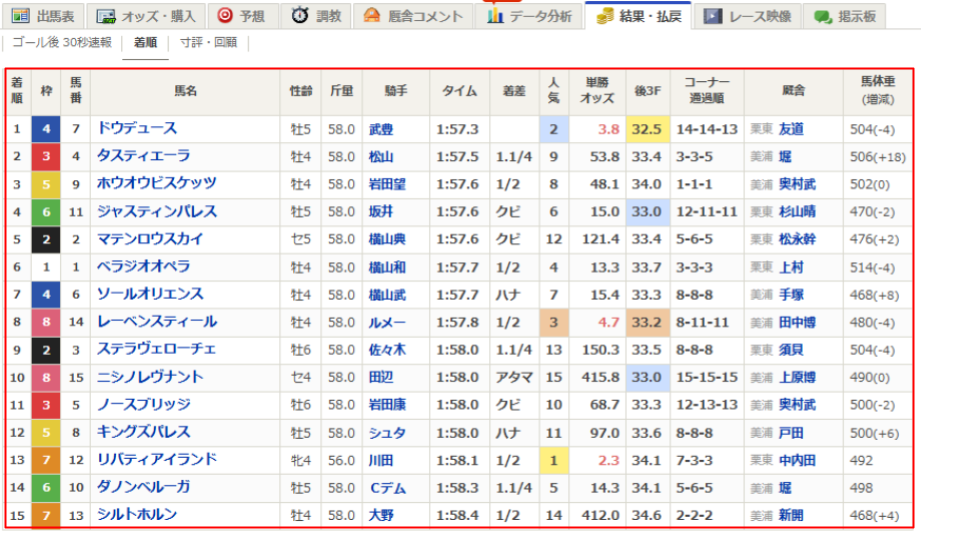
以下のURLから2024年10月27日に行われた天皇賞(秋)の結果を取得するサンプルコードを紹介します。
https://race.netkeiba.com/race/result.html?race_id=202405040811&rf=race_submenu
レースの結果・払戻のページから結果表をリストで取得します。
from bs4 import BeautifulSoup
import requests


URL = 'https://race.netkeiba.com/race/result.html?race_id=202405040811&rf=race_submenu'


def get_result_table(url: str) -> list[list[str]]:
    headers = {
        'User-Agent': 'Your User-Agent'  # 置換必要
    }

    r = requests.get(url, headers=headers)
    r.raise_for_status()

    soup = BeautifulSoup(r.content, 'lxml')

    result_table = []

    for tr_tag in soup.select('#All_Result_Table tr'):
        result_table.append([data_tag.text.strip() for data_tag in tr_tag.select('th, td')])

    return result_table


if __name__ == '__main__':
    result_table = get_result_table(URL)
    print(result_table)

'''
[
    ['着順', '枠', '馬番', '馬名', '性齢', ..., '厩舎', '馬体重(増減)'],
    ['1', '4', '7', 'ドウデュース', '牡5', ..., '栗東友 道', '504(-4)'],
    ...
    ['15', '7', '13', 'シルトホルン', '牡4', ..., '美浦新開', '468(+4)']
]
'''
レースの結果を取得するサンプルコード2
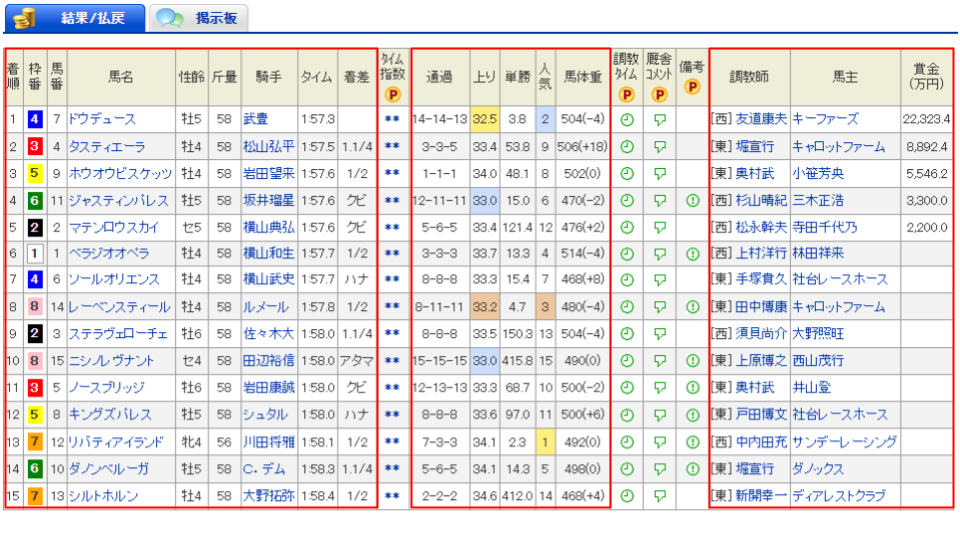
以下のURLから2024年10月27日に行われた天皇賞(秋)の結果を取得するサンプルコードを紹介します。
https://db.netkeiba.com/race/202405040811
先ほどの「レースの結果を取得するサンプルコード1」のURLとは異なり、データベースページのレースの結果・払戻のページから結果表をリストで取得します。なお、プレミアム限定の列は除外しています。
from bs4 import BeautifulSoup
import requests


URL = 'https://db.netkeiba.com/race/202405040811/'


def get_result_table(url: str) -> list[list[str]]:
    headers = {
        'User-Agent': 'Your User-Agent'  # 置換必要
    }

    r = requests.get(url, headers=headers)
    r.raise_for_status()

    soup = BeautifulSoup(r.content, 'lxml')

    result_table = []

    for tr_tag in soup.select('.race_table_01 tr'):
        row = []
        for i, data_tag in enumerate(tr_tag.select('th, td')):
            # プレミアム限定列は除外
            if i in [9, 15, 16, 17]:
                continue

            row.append(data_tag.text.strip())

        result_table.append(row)

    return result_table


if __name__ == '__main__':
    result_table = get_result_table(URL)
    print(result_table)

'''
[
    ['着順', '枠番', '馬番', '馬名', '性齢', '斤量', '騎手', 'タイム', '着差', '通過', '上り', '単勝', '人気', '馬体重', '調教師', '馬主', '賞金(万円)'],
    ['1', '4', '7', 'ドウデュース', '牡5', '58', '武豊', '1:57.3', '', '14-14-13', '32.5', '3.8', '2', '504(-4)', '[西]\n友道康夫', 'キーファーズ', '22,323.4'],
    ...
    ['15', '7', '13', 'シルトホルン', '牡4', '58', '大野拓弥', '1:58.4', '1/2', '2-2-2', '34.6', '412.0', '14', '468(+4)', '[東]\n新開幸一', 'デ ィアレストクラブ', '']
]
'''
レースの払い戻しを取得するサンプルコード
以下のURLから2024年10月27日に行われた天皇賞(秋)の払い戻しを取得するサンプルコードを紹介します。
https://db.netkeiba.com/race/202405040811
データベースページのレースの結果・払戻のページから払い戻し表をリストで取得します。

from bs4 import BeautifulSoup
import requests


URL = 'https://db.netkeiba.com/race/202405040811/'


def get_pay_table(url: str) -> list[list[str]]:
    headers = {
        'User-Agent': 'Your User-Agent'  # 置換必要
    }

    r = requests.get(url, headers=headers)
    r.raise_for_status()

    soup = BeautifulSoup(r.content, 'lxml')

    pay_table = []

    for table_tag in soup.select('.pay_table_01'):
        for tr_tag in table_tag.select('tr'):
            # get_text('\n')とすることで<br>タグを\nに変換
            pay_table.append([data_tag.get_text('\n').strip() for data_tag in tr_tag.select('th, td')])

    return pay_table


if __name__ == '__main__':
    pay_table = get_pay_table(URL)
    print(pay_table)

'''
[
    ['単勝', '7', '380', '2'],
    ['複勝', '7\n4\n9', '200\n1,020\n1,000', '2\n9\n8'],
    ...
    ['三連単', '7 → 4 → 9', '397,100', '612']
]
'''
コメント